> For the complete documentation index, see [llms.txt](https://userguidesgitbook.aerofiler.com.au/llms.txt). Markdown versions of documentation pages are available by appending `.md` to page URLs; this page is available as [Markdown](https://userguidesgitbook.aerofiler.com.au/reports/upcoming-contract-events-table.md).
# Upcoming Contract Events (Table)
Aerofiler can generate a variety of reports to help you analyse your contract data. Aerofiler provides a number of default reports that you can access by clicking the “Reports” menu item:
In this card:

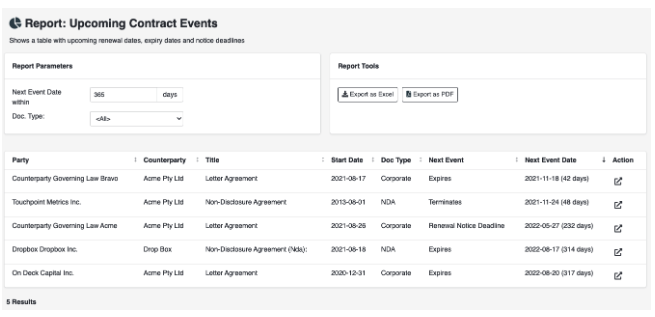
you can configure two parameters:
* Next Event Date within - use this parameter to filter upcoming contract events within a window of interest eg the upcoming half or quarter
* Contract Type - use this parameter to filter events only for a contract of a particular type
From this screen, you can export the report in Excel or PDF format:
**Fields**
The following fields are reported by default:
* Party
* Counterparty
* Title
* Start Date
* Doc Type
* Next Event
* Next Event Date
The icon in the "Action" column links to the document.